Blogger Template ko Zip File Se xml File me Convert kaise Kare
You will know that Blogger only supports xml format file. If you download Blog Template from a website, then more level will be in zip format file. So for this, the zip file has to be converted to xml file. So, in this post today, we are going to tell you about this.

Currently, all the popular template providers on the Internet provide them in the Template zip file itself. Many Blogger are not well aware of zip file.
When a new blogger downloads the Template in a zip file from somewhere and uploads it in his blog, it is very sad if the template does not change at that time.
When a new blogger downloads the Template in a zip file from somewhere and uploads it in his blog, it is very sad if the template does not change at that time.
If you want to convert to Computer, then you download and install WinRar Software in Computer.
- Now open the zip file in WinRar.
- After opening click on Extract above then a popup window will open here in the Update mode option select Extract and update files and in overwrite mode select Rename Automatically
- Now select the file where to save, then click on the save button.
Bye the way, if you do not have a computer then Android phone will definitely be there. You can also easily convert zip file to xml file from your Android phone. I am telling you about it very well below.
Step 1: First of all, download and install Win Zip App.
Step 2: Open WinZip and click on the Menu icon.
- If the template of the zip file is in the internal or external memory of your mobile, then click on Storage.
- Now open the external or internal memory by clicking where the zip file is.

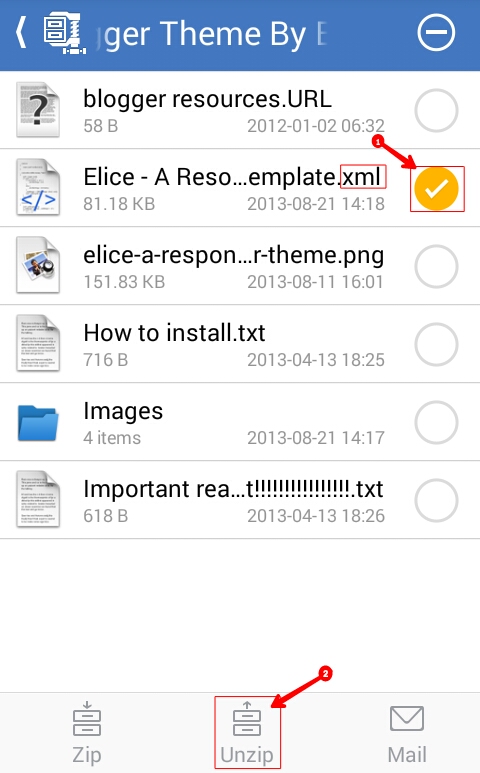
- Now tick in front of the file in which the .xml is written.
- Now click on Unzip to.
- If you want to save to internal or external memory, click on storage.
- After that now after choosing Enternal or External Momory, click on Unzip here.
Step 3:
Step 4: Now save xml file here

I hope you will like this post and you will not have any problem in converting the file. If you have any question related to it, then you comment us or share it if you find the post helpful.
Comments
Post a Comment